

The Contact Center IVR Toolkit gives a Copilot Studio voice agent the four things it cannot get on its own: whether a queue is open, how busy it is, what to say about it, and how to ring somebody back. Open source, MIT, and now working end to end on a real phone line.
01 · The problem
An agent that cannot see the queue will confidently lie about it
Build a voice agent in Copilot Studio and the first ten minutes are magic. It greets the caller, understands a rambling Dutch sentence, and routes. Then somebody asks the only question callers actually ask.
“Zijn jullie nog open?”
Are you still open?
The agent has no idea. Opening hours live on an operating-hours calendar hanging off the workstream, expressed as recurrence rules that are genuinely awkward to read: the outer rule holds only the recurrence, and the real times sit on an inner calendar as an offset in minutes from midnight. Read them by hand and you get a queue that is open from midnight to midnight. Ask an agent to work it out and it will invent an answer, because inventing answers is what it is good at.
Live queue state is worse. Waiting counts and agent presence live in internal platform tables with no API guarantee. Callback needs writes, deduplication and a retry policy. And every one of these answers has to come back in a form a person can hear, in their language, in under half a second, because a caller is on the line.
That is the gap. It is the same gap on every contact centre project, it gets rebuilt badly each time under deadline pressure, and it is not interesting work. So it is now a toolkit instead.
02 · What it is
Seventeen Custom APIs, and one of them does most of the work
The toolkit is a Dataverse solution: plug-in assembly, configuration tables, a model-driven app for administrators, and a set of Custom APIs your agent calls. No Azure required. No infrastructure to own. It installs into the environment Contact Center is already running in.
Queues and hours
- GetQueues
- ResolveQueue
- GetQueueHours
- IsQueueOpen
- GetNextOpenTime
Opening hours from the native calendar, or from the toolkit's own tables when you would rather not depend on internal schema.
Live state
- GetQueueMetrics
- GetQueueContext
Waiting counts, longest wait, representatives online and available. GetQueueContext returns all of it plus hours and a broadcast message in one round trip.
Callback
- CheckCallbackEligibility
- GetCallbackSlots
- CreateCallback
- GetCallbackStatus
- CancelCallback
- RescheduleCallback
The whole lifecycle. A caller can ring back tomorrow and move the slot they booked today.
Utility
- ValidatePhoneNumber
- GetBroadcastMessage
- LogIvrOutcome
- HealthCheck
Speech recognition produces dirty phone numbers. This one endpoint has saved more calls than any other.
GetQueueContext is the one to start with. It duplicates outputs that other endpoints also return, and that is the point: one call gives the agent open state, wait band, callback availability, a broadcast message and a recommended action. Four round trips on a voice call is four times the latency, and latency on voice is silence.
03 · Design
Seven rules, and the first one is the whole product
1. Bands, not numbers
Raw seconds are for supervisors. A caller does not want to hear “the current wait is 247 seconds”. They want to know whether to hold on. So the toolkit returns a WaitBand, and the thresholds are configuration rather than opinion.
De wachttijd is op dit moment een paar minuten.
95s waiting · agent action: offer a callback
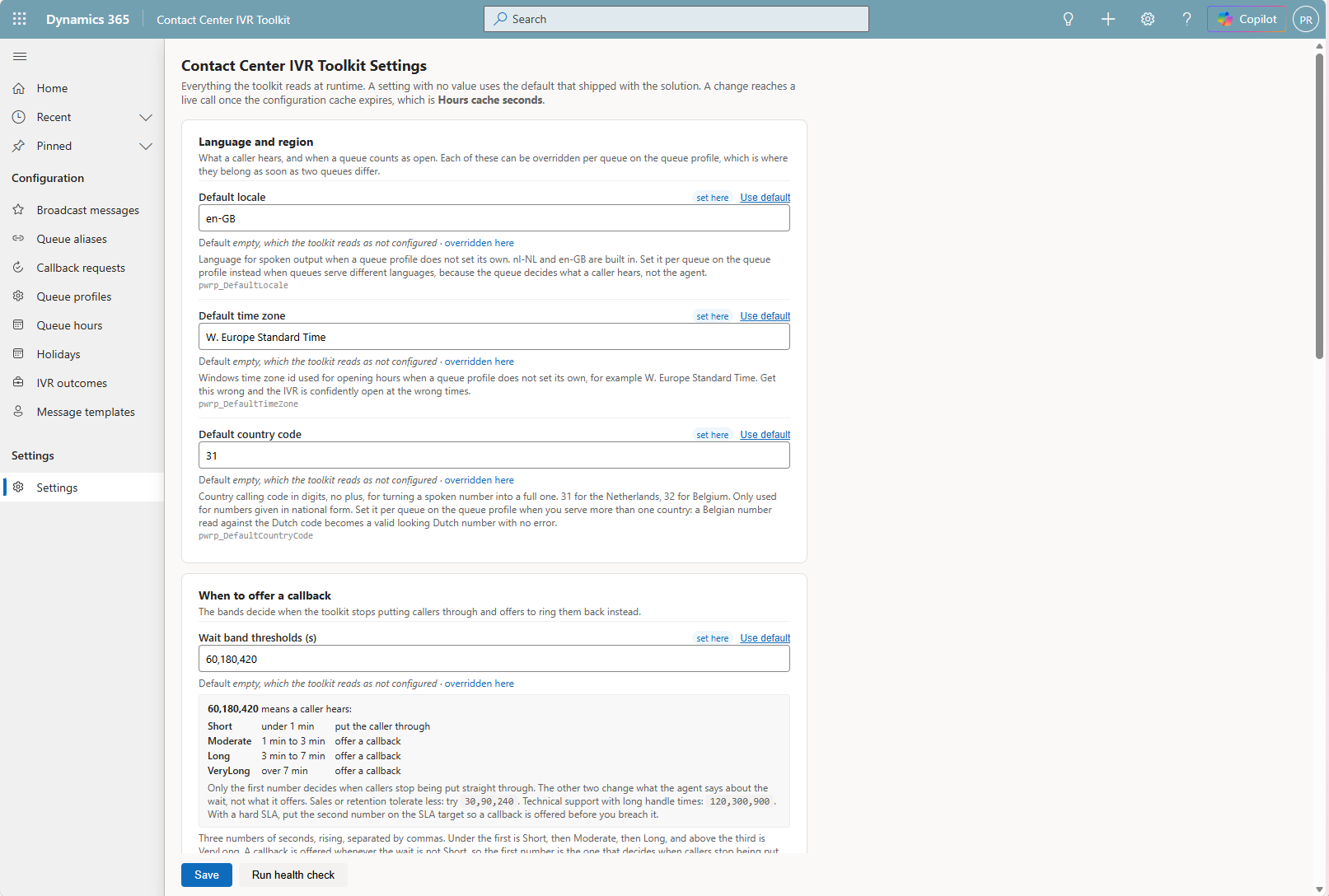
Only the first number decides when callers stop being put straight through. The other two change what the agent says about the wait, not what it offers. Sales and retention tolerate less: try 30,90,240. Technical support with long handle times: 120,300,900.
2. Names, not GUIDs
A speech IVR never has a queue id. It has whatever the caller said, which might be “personeelszaken”, “HR afdeling” or “de boekhouder”. Every endpoint accepts a name, an alias or an id, and resolves it. When two queues match, it does not guess. It returns QUEUE_AMBIGUOUS so the agent asks a clarifying question, which is what a person would do.
3. Errors are data, not exceptions
An expected failure returns HTTP 200 with Success: false and a stable ErrorCode. A voice agent never sees a platform fault, and never tells a caller that a system is down. This extends to the MCP route, where an expected failure deliberately keeps isError false: QUEUE_AMBIGUOUS is an answer, and an agent that sees an error retries blindly instead of asking which queue was meant.
4. Every response is speakable
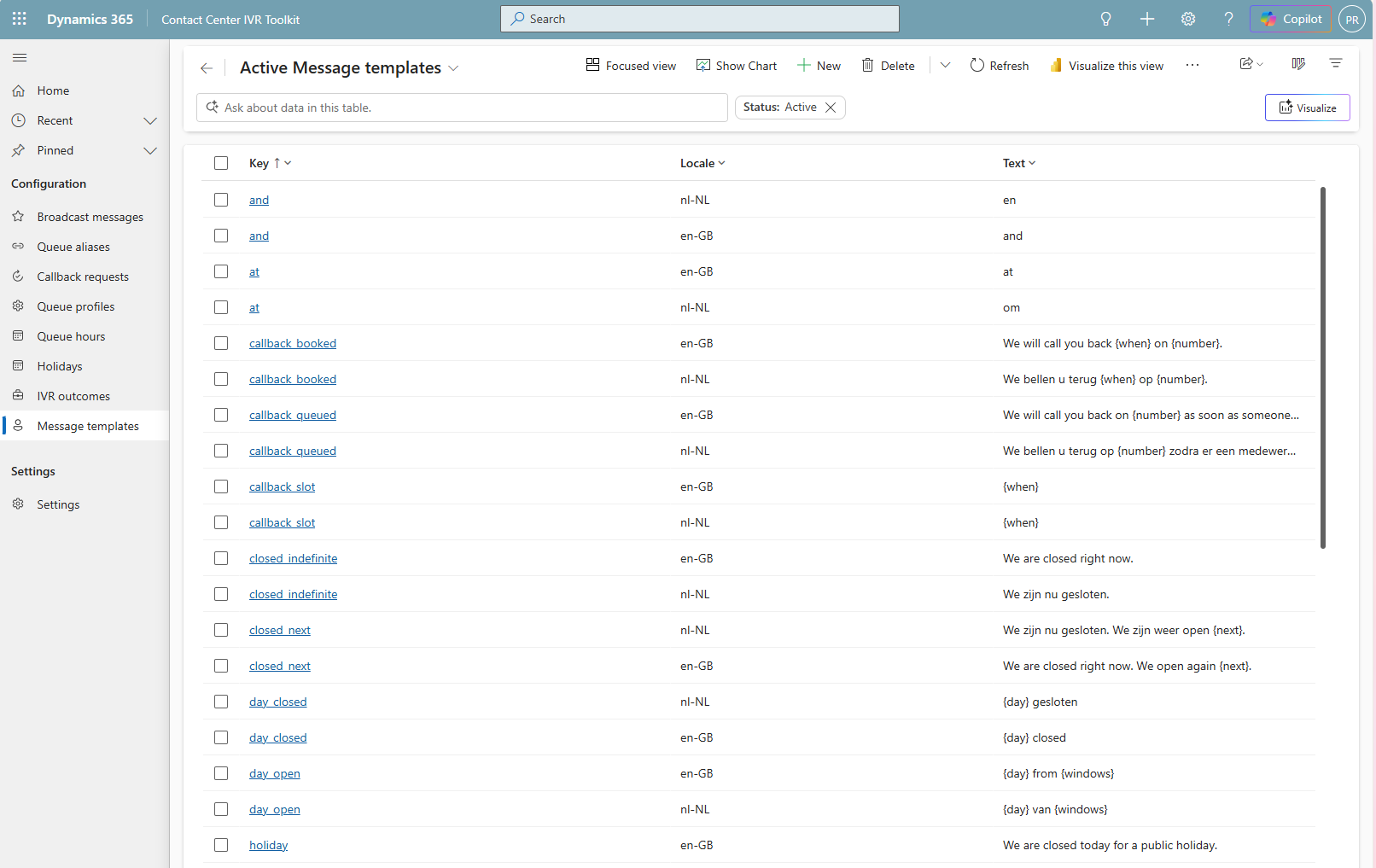
Structured data is not enough. Each response carries a locale-aware phrase the agent can read straight out, assembled from templates an administrator can edit without a developer.
“We zijn vandaag gesloten in verband met Koningsdag.
”Named holidays, from the holiday table“
We bellen u terug morgen om 10:30 op 06 5374 0141.”
Callback confirmation, with the number the caller actually said
5. Never let a metrics failure fail a call
The metrics reader touches internal platform tables that carry no API guarantee. When it throws, GetQueueContext catches it, defaults the wait band to Moderate and carries on. A caller must never hear that a system is down because a schema moved in a release wave. Every reference to those tables is quarantined in a single file, so a wave update is a one-file fix.
6. Write operations are idempotent
Voice agents retry on timeouts. CreateCallback deduplicates per queue and number, so a retry returns the existing booking rather than ringing somebody twice. Promotion is a status transition, so running it twice is harmless.
7. Nothing client specific in code
Aliases, thresholds, wording, hours, time zones and locales all live in configuration tables. If you find yourself typing a client's name into a C# file, stop.
04 · Callback
The part that is a real build
Direct callback is native. Configure it as a queue overflow action and the platform holds the caller's place and rings them back. The toolkit only reports on it. Rebuilding that would be foolish.
Scheduled callback is different. It is the caller who says “not now, ring me Tuesday morning”. That needs bookable slots derived from opening hours and existing bookings, a phone number normalised out of speech recognition, a booking that survives a retry, and a way for the caller to change their mind next week.
| Stage | What happens | Status |
|---|---|---|
| Offer | Slots derived from opening hours, minus slots already at capacity | — |
| Book | Number normalised to E.164, contact matched on the number, request written | Requested |
| Promote | A flow runs every five minutes and hands due requests to proactive engagement | Queued |
| Place | Proactive engagement dials, in whichever mode you configured | Queued |
| Close | The next promotion run reads the delivery back and moves the record on | Completed |
The toolkit does not dial. Proactive engagement owns pacing, consent, quiet hours, capacity and answering-machine detection, and reimplementing any of that would be both worse and a compliance problem. The toolkit books, dispatches and reports.
05 · The obvious question
Microsoft just shipped customer-first callback. Why build this?
Fair question, and the honest answer is that where the native feature fits, you should use it. Customer-first direct callback rings the customer before it reserves a representative, so nobody sits listening to a voicemail greeting. That is better than anything a toolkit would build, and it handles queue position and retries for you.
It answers a different question. It is an overflow action: the caller is already queueing, the queue is already overflowing, and the request keeps its place until it reaches the front. The caller never picks a time, because there is no time to pick. The promise is “we will not make you hold”, not “we will ring you at three”.
| Customer-first direct callback | Scheduled callback here | |
|---|---|---|
| Triggered by | Queue overflow | Anything the agent decides |
| When the call goes out | When the request reaches the front of the queue | In the window the caller chose |
| Caller picks a time | No | Yes, from offered slots |
| Change it afterwards | No | Reschedule or cancel by reference |
| Works out of hours | No, the caller has to be queueing | Yes |
| Needs a Copilot Studio agent | Yes, and enabling is irreversible | No |
One row deserves emphasis. Enabling customer-first direct callback cannot be undone, and on setup the first callback profile is applied automatically to every queue already using direct callback as an overflow action. That is a decision, not a setting.
So they are complements. Use the native one on the overflow path. Use this for the caller who rings at nine in the evening, or does not want to hold at all, or booked Tuesday and now needs Wednesday. None of those start with a queue.
06 · Cost
The AI credits question, answered carefully
There is a real difference here, and it is narrower than a marketing page would make it. Here is exactly what can be substantiated from Microsoft's own documentation.
Customer-first direct callback requires provisioning a Copilot Studio Callback Agent, and the documentation states plainly that “AI agent use can consume available Copilot or Microsoft service credits”. The AI agent sits on the outbound leg, engaging the customer after they answer, verifying them and collecting information before a representative joins.
The toolkit's scheduled callback puts no AI agent on the outbound leg. In preview dial mode a human representative accepts the notification and speaks to the customer. The outbound call consumes telephony, not Copilot credits.
Now the caveats, because they matter:
- The inbound leg is a Copilot Studio agent in both cases. This toolkit does not make your IVR free. It changes what the callback leg costs, not what the IVR costs.
- If you choose Copilot dial mode for proactive engagement, you have put an AI agent back on the outbound leg, and the difference disappears. The dial mode is yours to choose and the toolkit has no opinion about it.
- No measurement has been taken. There is no benchmark here, no percentage, no cost-per-callback comparison. The claim is structural: one architecture requires an AI agent in the callback path and the other does not.
If somebody tells you a number for this, ask them how they measured it. The honest version is simply that a human-led callback does not spend Copilot credits, and a customer-first callback is documented as being able to.
07 · Administration
Everything a client changes, a client can change
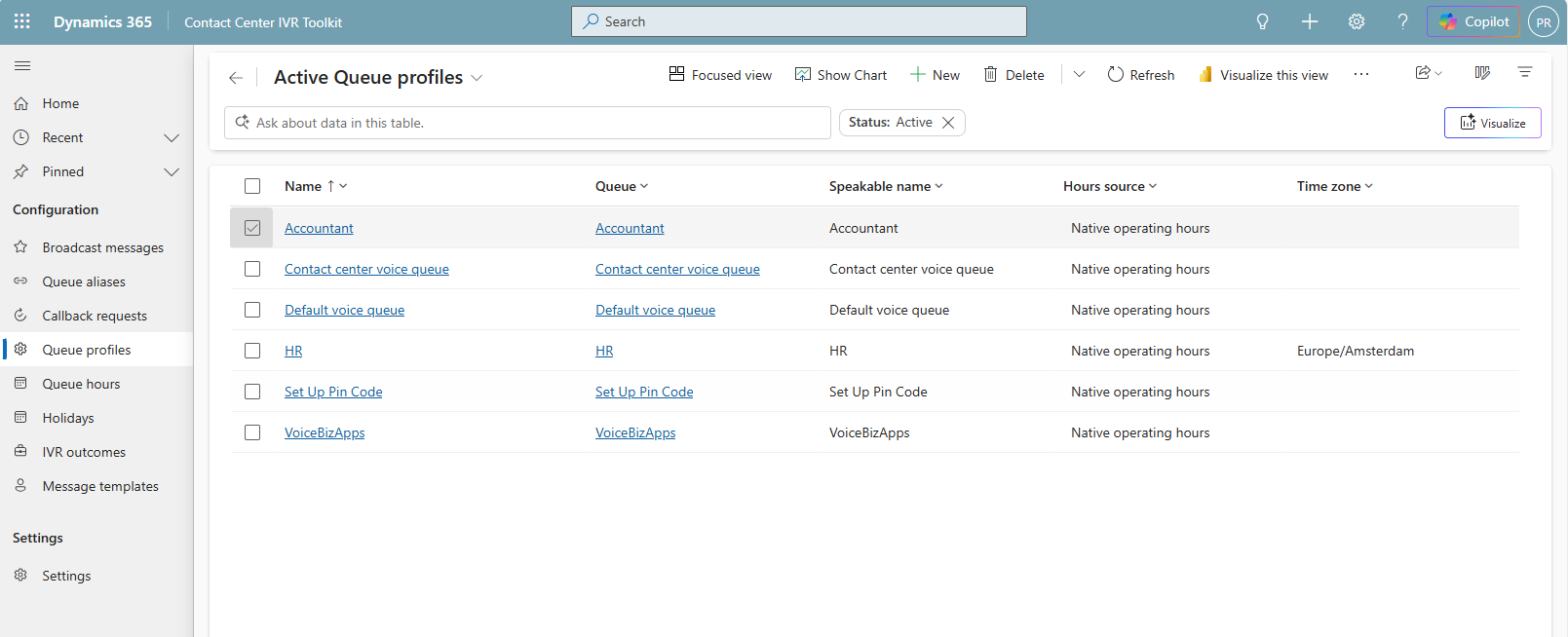
The toolkit ships a model-driven app. Not because every project needs one, but because the alternative is a consultant editing environment variables in the maker portal at four in the afternoon while somebody waits.
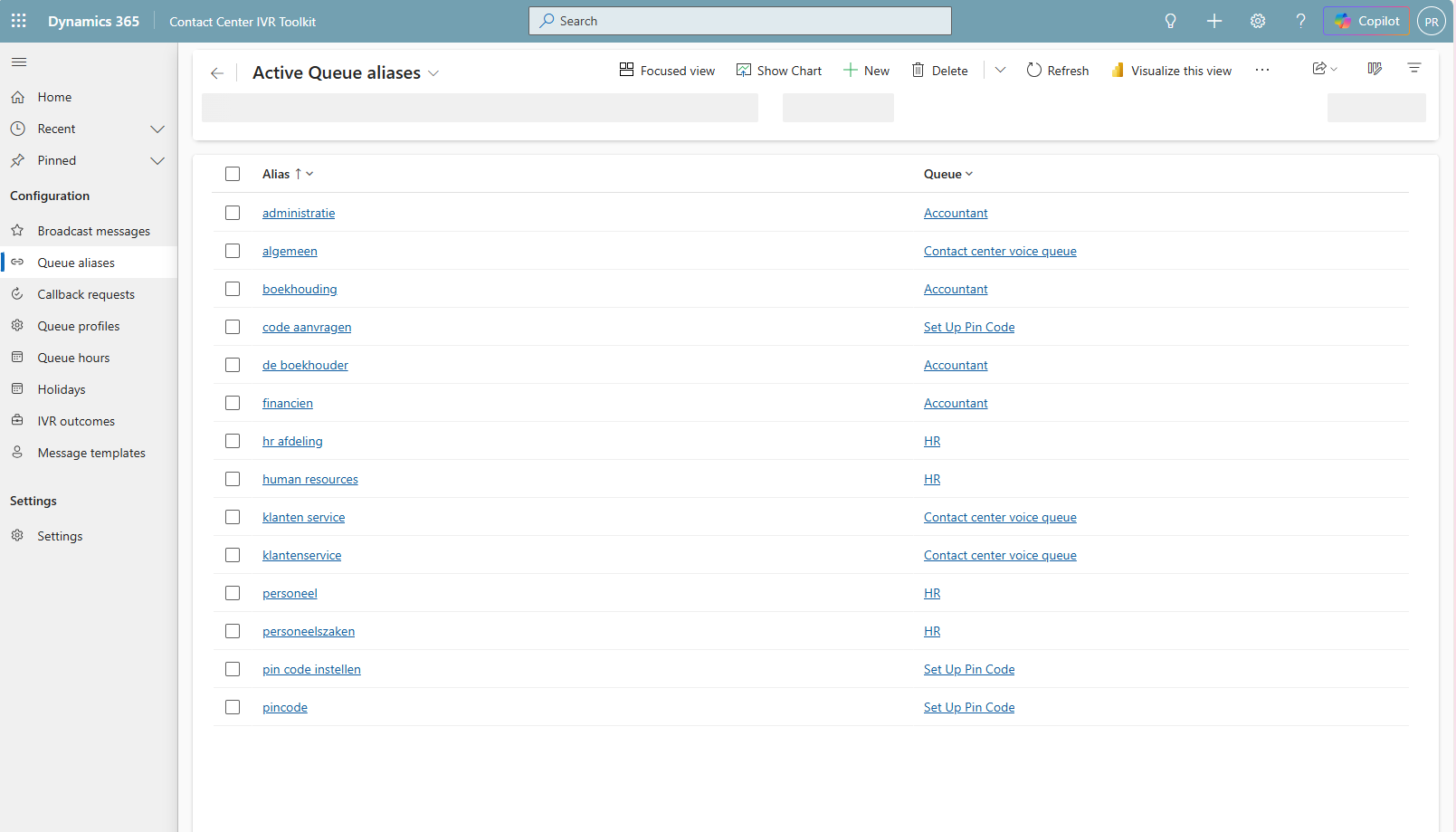
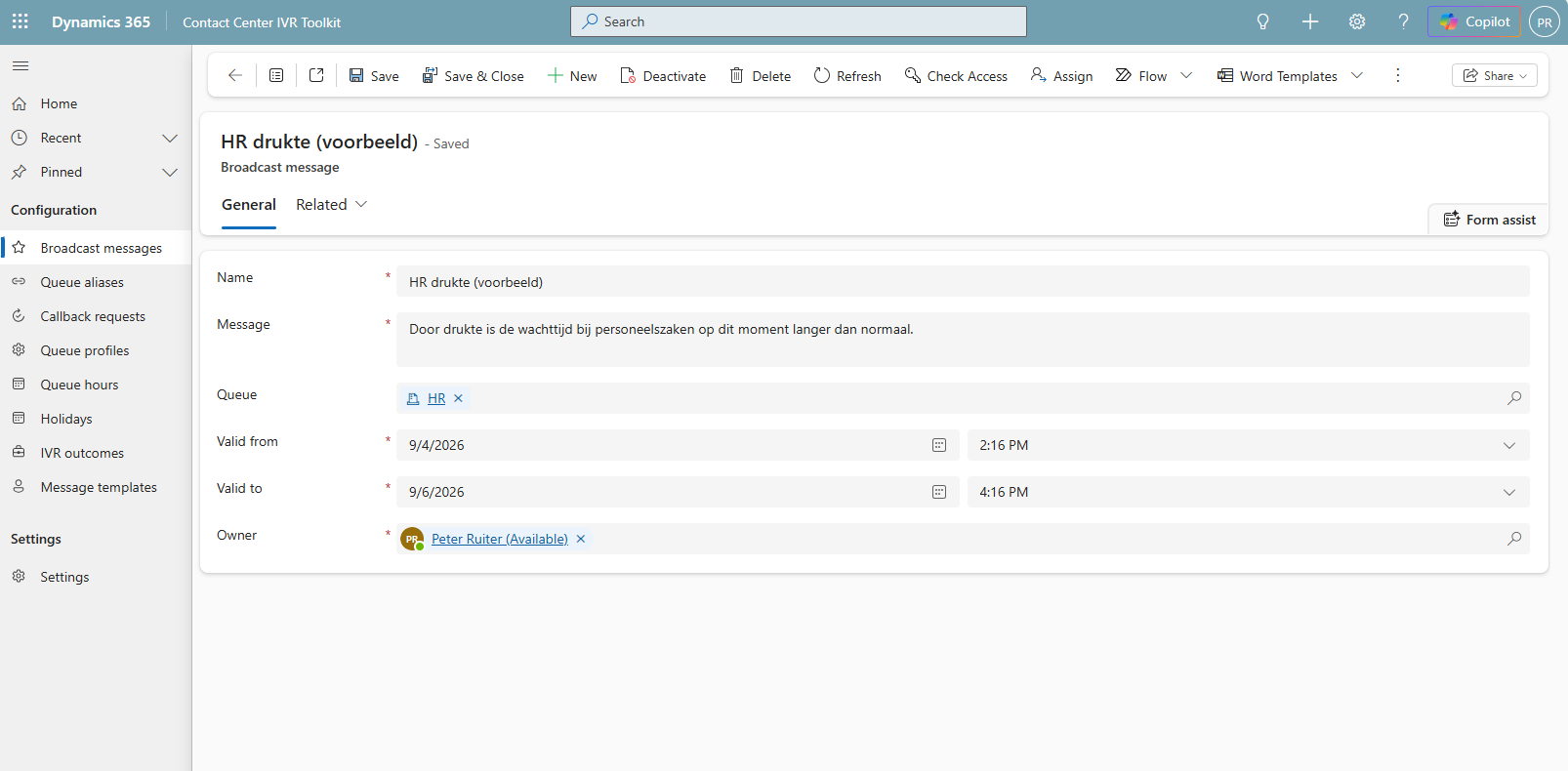
Queue aliases are the highest-return configuration in the toolkit
A queue called “HR” in Dataverse is called “personeelszaken”, “personeel” and “human resources” by actual callers. Aliases map what people say to what the system calls it. And when resolution fails, the spoken text is recorded on the outcome row, so the list of things callers say that you do not recognise writes itself from real calls.
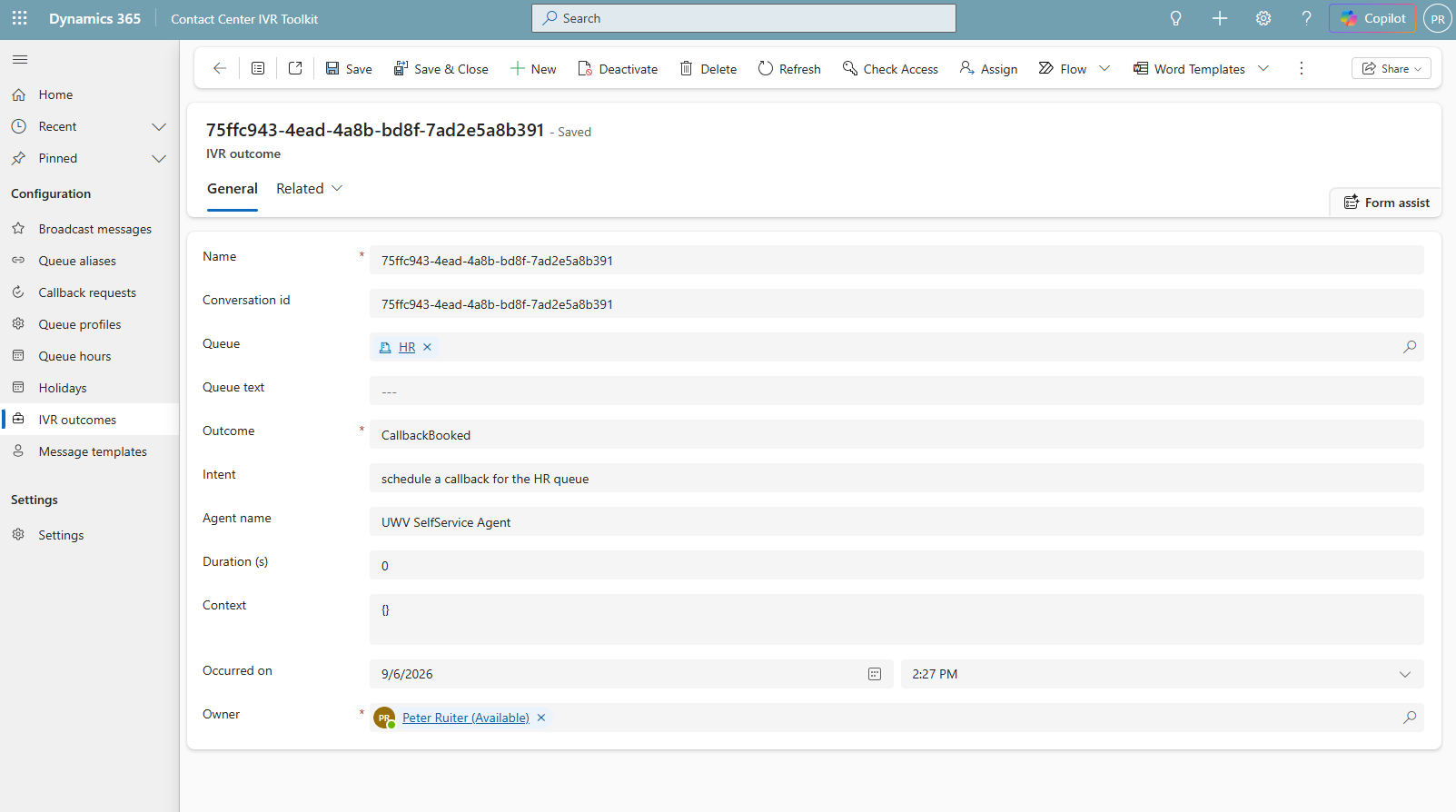
And the reporting writes itself
One row per conversation, with the outcome, the intent, the duration and whatever context the agent chose to keep. Containment and deflection reporting comes out of a single table, and the queue text column doubles as your backlog of missing aliases.
08 · Installation
Half an hour, if the outbound side is already configured
Everything below assumes a Dynamics 365 Contact Center environment and the Power Platform CLI. Nothing here needs Azure.
Install the solution
Download the managed solution from the release and import it, or run the installer, which creates the schema, registers the Custom APIs, seeds the configuration and builds the administration app.
# everything, in order
./build/install.ps1 -EnvironmentUrl https://yourorg.crm4.dynamics.com
Create queue profiles
One row per voice queue, with its speakable name, its locale and its time zone. The script creates them for every voice queue it finds, and you correct the ones that need correcting.
Add aliases
The single highest-return thing you will do. Sit with whoever answers the phones and write down what callers actually say.
Point your agent at it
In Copilot Studio, add the Custom APIs as tools through the Dataverse connector. Nine of them cover the whole surface an agent needs. Start with GetQueueContext and add the callback lifecycle when you need it.
Only if you want scheduled callback
Configure an outbound workstream with a proactive engagement on it, set the audience to the CCaaS API and the contact identifier to contactid, then run the promotion flow script. The toolkit finds the engagement on the workstream, so there is no id to copy.
./build/New-PromotionFlow.ps1 -EnvironmentUrl https://yourorg.crm4.dynamics.com
Run the health check
It reads what is configured and what is actually happening, including whether callbacks are going overdue, which is the difference between a configuration that looks right and one that works.
./build/Test-Installation.ps1 -EnvironmentUrl https://yourorg.crm4.dynamics.com
There is a second route, if you want one
An optional MCP server proxies the same Custom APIs over streamable HTTP, so tools appear in agents dynamically when the contract changes. It is roughly three hundred lines and the tool catalogue is generated from the contract file at startup, so the two routes cannot disagree about what an agent needs.
Most deployments should not use it. The Dataverse connector calls the same APIs with one fewer hop and no infrastructure to own, and the extra hop costs thirty to eighty milliseconds on every call. On voice, that is real. Deploy it when several teams share the toolkit and you want one place to change the tool surface.
MIT licensed. Fourteen documents. No strings.
Built to be reusable across deployments rather than for one client, which raises the bar on contract stability, configuration separation and documentation. Fork it, install it, file an issue, or tell me the design decision I got wrong.
Comments